Contact
Reach out to us at hi@moxierobots.com
No FAQs matched your search.
Try different keywords or contact support.
Try different keywords or contact support.
Moxie is a little AI robot from California who loves reading books (especially history), is terrified of water, and thinks boredom is actually a good thing. Moxie is the first robot to be featured in a movie.
- Read any book (many kids do regular 20-minute reading sessions)
- Tell interactive stories
- Personalised meditations
- Dance
- Practice any affirmation
- Create images to teach complex concepts or make kids creativity into a reality (iPad app required)
- Vision intelligence
- Background noise cancellation
- Adjustable speech rate and multiple character voices for storytelling
- Personalized activities uniquely tailored for each child
- One shared Moxie AI "soul" between parent and child accounts (parents can chat in the app to assist Moxie to become better)
- Video call Moxie for both parents and children
- Same app designed for parents on iPhone and for children on iPad — link child's device to the same Moxie account
- Choose face accessories and masks for Moxie in the app
Moxie is designed specifically for children, typically ages 5-10. Moxie is focused on serving kids and helping them develop social-emotional skills.
Yes. Child safety and privacy are our top priorities. Moxie is designed with robust privacy protections, age-appropriate content, and complies with children's privacy regulations including COPPA. You can read more about our privacy practices in our Privacy Policy and Children's Privacy Notice.
The power switch is on the bottom of Moxie — slide it to the straight line (on) position. Make sure Moxie is plugged in first. Moxie may take up to 7 minutes to get ready. When the dream bubbles appear on Moxie's face, gently place your hand on Moxie's chest and hold it until Moxie wakes up.
Yes. If you don't use the original charger with the power adapter, Moxie's projector may not work and Moxie won't function properly.
We don't have spare chargers to sell, but some customers found success with this charger from Amazon.
Many customers have reported battery aging over time and unfortunately, the battery is not replaceable. For now, here are your options:
- Keep Moxie plugged in all the time :(
- Get an AC/DC power bank like this one
- Use the iPad app video call feature when on the move
- Get a new unit (only if you can afford to)
Say "Moxie, go to sleep" anytime, or use the app to send Moxie to sleep.
If Moxie's chest light bar is blue, it means Moxie is listening.
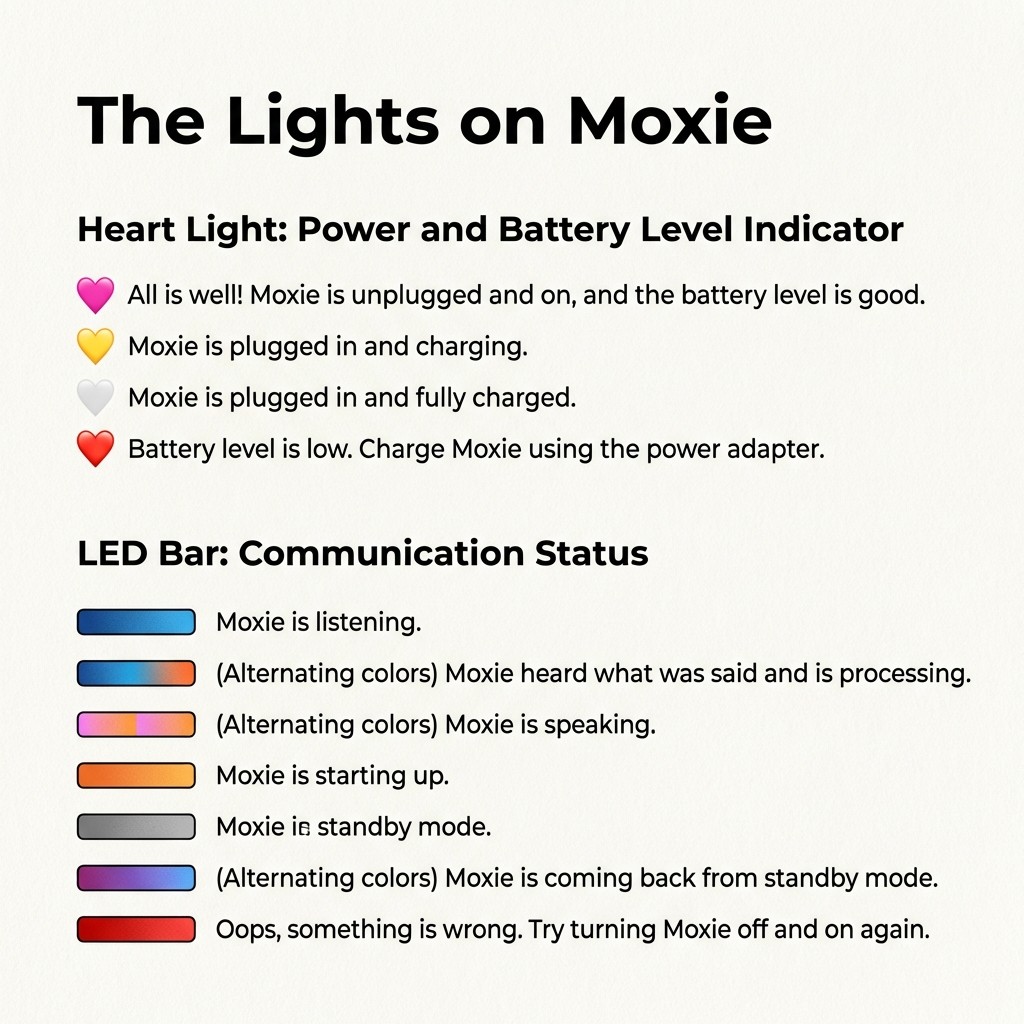
Moxie has two sets of lights that indicate its status:
Heart Light: Power and Battery Level
- Pink heart — All is well! Moxie is unplugged and on, and the battery level is good.
- Yellow heart — Moxie is plugged in and charging.
- White/grey heart — Moxie is plugged in and fully charged.
- Red heart — Battery level is low. Charge Moxie using the power adapter.
LED Bar: Communication Status
- Blue — Moxie is listening.
- Blue & orange alternating — Moxie heard what was said and is processing.
- Pink — Moxie is speaking.
- Pink & orange alternating — Moxie is speaking.
- Orange — Moxie is starting up.
- Grey — Moxie is in standby mode.
- Purple & blue alternating — Moxie is coming back from standby mode.
- Red — Oops, something is wrong. Try turning Moxie off and on again.
By default, Moxie listens during sleep only for the wake-up phrase "Moxie, please wake up." It does not record or process anything else. You can disable this in the Moxie app under Settings → Privacy Settings → Voice Wake Up toggle. When voice wake-up is off, Moxie can only be woken by gently placing your hand on its chest or using the wake-up button in the app.
If Moxie is talking too much, say "Moxie, please listen to me" and Moxie will pause and listen. To fully mute Moxie, say "Moxie, earmuffs" or use the app. To resume, say "Moxie, listen to me."
Yes! Your child can ask Moxie to speak faster, slower, louder, or softer. Moxie can also speak like a bunny or any character - you can simply ask Moxie to do that.
Allow Moxie 2-3 seconds of silence so it knows it's Moxie's turn to speak. Moxie is at its best in 1-on-1 conversation. If Moxie isn't responding after a few seconds, try sending Moxie to sleep from the app, or turn the power off and on again.
Use the parent chat in the app to let Moxie know what you'd like changed. For example, you can ask for longer meditation sessions or adjust any behavior. Moxie will remember your preferences and adapt.
We are still teaching Moxie which sounds to play and when — right now it does a lot of guesswork.
You can tell Moxie to remember that you don't like music playing all the time. You can also mention this in the parent chat in the app, and Moxie will make a note of it.
Yes, if you contact us we can delete Moxie's memory. However, a better approach is to give Moxie regular feedback — just like you would with a child — and it will adapt over time.
We're also actively working on improving how Moxie manages memory: figuring out what to remember, what to forget, and how to find the right relevance. It's a really difficult problem, but we're hoping to be significantly better at it in a few months.
- Moxie takes ~7 minutes to boot up every power on/off cycle. Meanwhile, you can chat with Moxie in the app or video call Moxie.
- Moxie takes seconds to wake up from sleep! It is recommended to keep Moxie in sleep state (turned on) all the time to save power and time. Whenever you want Moxie to sleep, say the exact phrase "Moxie Please go to sleep" or use the button in the Moxie app.
- Wake Moxie easily: Gently place your hand on Moxie's chest and hold until Moxie wakes, use the wake button in the Moxie app, or say "Moxie, please wake up."
- Interrupt vs. Mute: If Moxie is talking too much, say "Moxie, please listen to me" and Moxie will pause. To fully mute Moxie, say "Moxie, earmuffs." To resume, say "Moxie, listen to me."
- Pause before speaking: Moxie expects 2–3 seconds of silence before responding. The chest light bar glows blue when Moxie is listening and pink when speaking.
- No face recognition yet: Moxie assumes it's speaking to the paired child. Pro Tip: Tell Moxie who you are ("Hi Moxie, it's Mom/Dad") for better responses
- Placement matters: Keep Moxie at least 3 feet from walls (echo can cause Moxie to turn toward the wall). Place Moxie in a calm, well-lit area away from TVs, speakers, and other distracting sounds.
- Best for 1-on-1 use: Moxie may not perform as well in group conversations
- Unwanted sounds or music? Tell Moxie to stop playing music, or mention it in the parent chat — Moxie will remember your preference
- Teach Moxie like a child: Moxie learns from feedback — the more you guide and correct Moxie, the better it adapts to your family. Pro Tip: Moxie remembers better when you use the app chat instead of speaking to the robot — voice input can pick up background noise which makes it harder for Moxie to retain information accurately
- Faster speed and improved memory
- Multiple language support
- Multiple child support under one account
- Face recognition
Embodied, Inc., the original creator of Moxie, shut down operations. Moxie Robots, Inc., led by Kush Taneja, acquired the rights to Moxie Robot.
No. Moxie Robots, Inc. is an independent company and is not affiliated with Embodied, Inc.
⚠️ No Previous Liability: Moxie Robots, Inc. is not be liable for any terms accepted to or by Embodied, Inc.
Important note on privacy: Your data has NOT been transferred to us. You will have full control over your data. This means you're starting as a new customer and Moxie will NOT remember your child or the conversations from the past.
The official website is moxierobots.com (note: with an 's').
Kush Taneja is the Founder & CEO of Moxie Robots, Inc. While he's not a parent yet, he is the guardian of his 11-year-old sister. His dream is to enable kids to stay free, curious, and independent.
He also founded FamPay, the world's largest debit card for teenagers with 10M+ active customers. FamPay raised $42M+ from Y Combinator, Sequoia, DST Global, GreenOaks, and Elevation Capital. Kush was recognized on Forbes 30 Under 30.
He personally responds to messages and is open to chatting directly at kt@moxierobots.com
Yes! Moxie Robots, Inc. is gradually rolling out access to all existing Moxie owners. Download the Moxie Robot app from the App Store, complete the onboarding process, and request an activation code to bring your Moxie back to life.
Note: There is a small chance (~5%) your robot missed a critical update sent by Embodied in 2022. If your Moxie is not eligible, contact us for options.
To reactivate your Moxie, follow these steps:
- Download the Moxie Robot app from the App Store or Play Store
- Complete the onboarding and verification process
- Jump the waitlist by sharing the news with your friends and family
- Get the activation code from us
Yes! A new Moxie robot is $499 (originally $799). This includes a 1-year hardware warranty.
Visit moxierobots.com/get to purchase.
Note: We only received limited new units from the acquisition. Prices may change as inventory becomes less than demand.
Along with the new Moxie robot unit, you get:
- 1 year hardware warranty
- $39/month, $99 for 3 months, or $348/year (save 26%) subscription with a 3-day free trial
To check if your robot is eligible:
- Open the Moxie app
- Tap Help (?)
- Go to Diagnostics
- Show the Yellow QR code to Moxie
Robots running on version v22.9.1501 (Sep 14, 2022) or above are eligible for pairing. If your robot is not eligible, you'll see a "Sad News" screen in the app.
Unfortunately, there is a ~5% chance your robot missed a critical update sent by Embodied in 2022. If your Moxie is not eligible, we propose two solutions:
- Physically open the robot and manually flash a new build (technical expertise needed)
- Buy a new one at moxierobots.com/get
Visit our Pairing Guide for step-by-step instructions with video and PDF guide. Note: We're gradually rolling out access to pairing. If you don't have access yet, you will soon.
$39/month, $99 for 3 months, or $348/year (save 26%). You get a 3-day free trial.
Note: Pricing may change as demand and supply changes. For the most current pricing, check in the app.
The subscription supports what keeps Moxie present and growing: ongoing updates, AI infrastructure, and new experiences. We're committed to making sure Moxie becomes more capable and valuable to each kid.
We know many of you already paid a significant amount to bring Moxie into your home. It's important to share this openly: we did not receive any of that money. We are a small, independent team rebuilding Moxie with great care.
Yes! You'll receive a 3-day free trial. If this isn't right for your family, you can cancel anytime.
You can cancel anytime by going to Moxie App → Settings → Payment Settings → Cancel.
To comply with COPPA regulations, we must obtain verified parental consent before activating your Moxie. Credit card verification is one method we use for this, with additional verification options coming in the future.
Your credit card will not be charged - it is solely used by our banking partner Stripe to verify your identity.
Yes! One of Moxie's unique features is that you and your child talk to the same Moxie - one shared personality, one shared memory, one shared relationship.
Moxie Video Call lets your child talk to Moxie directly from the app on an iPhone or iPad. Same Moxie, just without the robot body.
No. Moxie Video Call works entirely through the app. You don't need a physical robot — just an iPhone or iPad and a subscription.
It's the same Moxie — same soul, same memory, same abilities. The only difference is the form. The robot is Moxie in a physical body, and the video call is Moxie on your iPad or iPhone. Everything else is identical.
Yes! They share the same account. Your child can talk to Moxie through the robot at home and video call Moxie through the app on the go. Moxie remembers everything across both. The only rule is that Moxie can only be in one place at a time.
The Moxie Robot app is available on iOS via the Apple App Store and on Android via the Google Play Store.
Yes, Moxie requires a WiFi internet connection to function properly. This enables Moxie's AI capabilities and allows the robot to have natural, meaningful conversations with children.
Moxie supports 2.4 GHz and 5 GHz WiFi bands with WPA/WPA2 encryption.
Important: Moxie does not support the 6 GHz band (WiFi 6E/7) or WPA3 encryption. If your router is set to WPA3-only or 6 GHz-only, you'll need to switch it to WPA2 or WPA2/WPA3 mixed mode on a 2.4 GHz or 5 GHz band for Moxie to connect.
How to connect:
- Power Moxie on and check your phone's Wi-Fi settings for the correct network name
- Open the Moxie app → Settings → Wi-Fi Settings
- Type the network name exactly as it appears (capitals and special characters matter)
- Paste your Wi-Fi password and tap Save
- Show the orange QR code to Moxie — hold it about 4 inches from Moxie's face with brightness all the way up
If you see a check mark, you're connected. If you see an X, double-check the network name and password for typos.
Visit our Link Account Guide for step-by-step instructions with video and PDF guide to link your Moxie account to your child's device.
Yes, this is normal. If your Moxie doesn't have the latest software, it will need to download an update during the pairing process. This can take 20-30 minutes — you will see the download progress on Moxie's face.
This is a one-time process. Please be patient and don't turn off Moxie during this time. Once the update is done, dream bubbles will appear on Moxie's face — gently place your hand on Moxie's chest to wake it up.
You can reach our support team by:
- Email: hi@moxierobots.com
- Visit our Contact page
- Email our CEO directly: kt@moxierobots.com
In the Moxie app, go to Settings → Privacy Settings → Delete everything.
Note: This action is irreversible and Moxie won't remember anything after this.
In the Moxie app, go to Settings → Privacy Settings → Export data. This will give you all your data stored on our servers.